

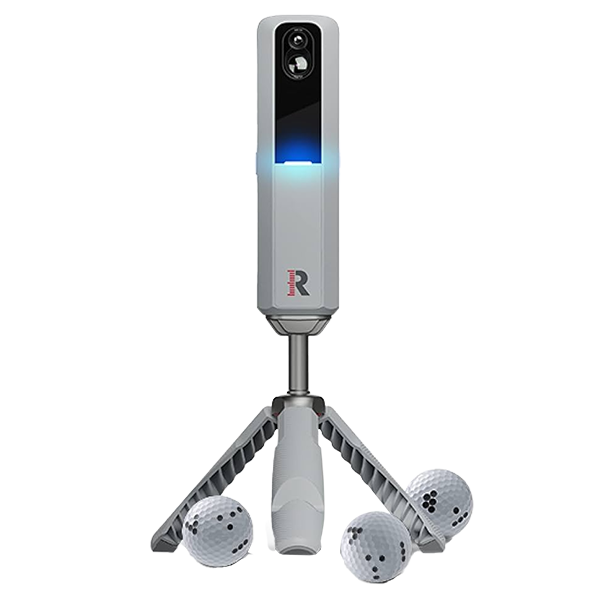
Everyone’s calling the Rapsodo MLM2Pro the best launch monitor under $1,000.
We get it. It’s got pro-level data, dual cameras, and 30,000 courses is a ridiculous package at this price.
But here’s the thing most reviews skip… there are quirks.
It needs more space than you’d think.
The graphics? Decent, but not Uneekor-level.
And it doesn’t measure putting at all.
That’s why I wanted to dig deeper.
Because if you know exactly what it does well (and where it’ll annoy you), this could be one of the best value launch monitors you’ll ever buy.
Let’s break it down — starting with the one thing Rapsodo never shouts about, but could save you hundreds if you know where to look.

📢 Need Help Choosing A Launch Monitor?
Use our free tools to make it easy:
🔍 Compare side-by-side
🎯 Filter by features
🤔 Take the quiz
Whether you’re comparing models, checking for essential features, or feeling unsure about your next step, our tools will help you break things down and make a well-informed decision.
Our Review Video
MLM2Pro Pricing Has A Hidden Deal
The MLM2PRO looks like a steal at $699.
But that’s only half the story.
To get the full experience like courses, GSPro compatibility, and slow-motion replays you need the premium membership at $199 per year.
You do get a 45-day free trial out of the box, which is a nice touch for testing everything before committing.

What’s strange is how Rapsodo handles this on their sites.
On the USA buying page, they shout about the 45-day free trial but don’t mention the $199 yearly fee anywhere obvious.
On the European site, it’s there… in tiny writing.
Here’s the part most golfers miss and where you can save yourself a chunk of cash.

Rapsodo quietly offers a lifetime membership for $499.
It’s barely advertised.
I had to ask their chatbot, and sure enough, it’s still available in the USA.
This gives you permanent access to everything the annual plan does, with no ongoing fees.
If you plan to use the MLM2PRO for more than 2.5 years, it’s the smarter financial move.

In real terms, the fully-unlocked price is $1,200.
The real question is whether you’ll be tempted to upgrade to another device before that 2.5-year break-even point.
Out of the box, you get that 45-day free trial of Premium.
Once that’s up, you’ve got two choices:
- Pay annually – $199/year for Premium.
- Buy the lifetime deal – $499 one-off payment for the same privileges forever.
Premium gets you a lot:
- 30,000+ courses
- Multiple virtual ranges
- Impact Vision
- Multi-angle Swing Vision
- 13 metrics, including measured spin axis and spin rate
- And a bunch of smaller quality-of-life features that add up fast
Pricing like this makes sense only when you see where the MLM2PRO sits in the wider market.
Our guide comparing the leading launch monitors breaks down which models offer the best value at each price level.
One thing to watch out for (and this catches a lot of people): GSPro connectivity isn’t free.
You can’t just plug it in and play.
To use GSPro, you still need to pay Rapsodo’s Premium fee plus GSPro’s own yearly subscription.
By contrast, the Square Golf Launch Monitor doesn’t charge extra for GSPro at all.
We explore that and other key differences in our Square Golf vs Rapsodo MLM2PRO comparison.
So if GSPro is on your must-have list, keep in mind that those annual fees can pile up fast unless you spring for the lifetime membership.
The lifetime deal fixes it — GSPro stays unlocked forever — but if you’re going year-to-year, it’s a slow bleed.
Indoor + Outdoor Versatility
This is a big one:
The MLM2PRO can be used indoors and outdoors, unlike its main competitor, Square, which only works indoors.
Its radar tracks full-flight shots at the range with the same accuracy as indoors. If you practise both at home and at the range, this flexibility is a big advantage over Square.

Accuracy
Accuracy wasn’t the MLM2PRO’s strongest point when it first launched — especially on short chips and spin readings — but after several software updates, it’s a completely different story.
Chipping, which used to be a real weakness, now reads consistently down to just a couple of yards.
Using the proper Rapsodo RPT balls, we’ve been happy with carry distance and spin numbers.
They’re reliable enough to trust for both practice and gap testing.

What we like most is that what we see on screen matches our feelings every single time. There are occasional no-reads, but we’d rather get a no-read than a bad read.
Short game accuracy
Short chips as low as 2 yards now register cleanly. Rollouts and spin reactions feel realistic, and the ball flight matches what we’re actually hitting, which is a big step up from early firmware versions.
Directional feedback:
Using RPT balls and the Target Range on our iPad, the directional feedback is spot on. If we hit right of centre, the ball flies right on screen.
It’s the same for a draw or a fade so the spin and curve feel true to the strike.
We confirmed this outdoors with range balls matching the direction of the ball flight on the virtual range.
Comparisons:
In many ways, the performance now rivals the Mevo+ minus a few club metrics. That’s high praise considering the price difference.

Where it can fall short:
There are still more setup variables here than with something like the Square, which is simpler to get level and running.

Indoor radar interference can cause accuracy dips if your environment isn’t ideal.
Overall, the accuracy has now improved significantly, especially if you take the time to optimise your setup and stick with the RPT balls.
Data metrics
This is one of the biggest leaps the Rapsodo MLM2PRO has made since launch.
Club Path and Angle of Attack are now measured and that’s a game changer.

Club Path shows exactly whether you’re swinging in-to-out or out-to-in.
That means you finally know why you hit a draw, a fade, a push, or a pull (instead of just guessing).
- Angle of Attack tells you if you’re hitting up or down on the ball.
Positive for drivers to maximise carry. - Negative for irons to really compress the ball.
Paired with Face Angle and Spin Axis, you now get a full cause-and-effect breakdown of your ball flight.

It’s the “why” behind your shot shape — and it’s addictive once you start matching feel to fact.
You also get measured spin rate with RPT balls, but here’s the kicker… it’s locked behind the premium membership.

I’m not a fan of hiding core metrics behind a paywall (especially when Square gives you everything out of the box).
| Club Data | Ball Data |
|---|---|
| Club Speed | Total Distance |
| Smash Factor | Carry Distance |
| Club Path (measured) | Side Carry |
| Angle of Attack (measured) | Ball Speed |
| Launch Direction | |
| Launch Angle | |
| Descent Angle | |
| Shot Apex | |
| Shot Type | |
| Spin Rate (measured) | |
| Spin Axis (measured) |
Outdoors or indoors, it’s now accurate enough that I’d happily use it for serious practice and gapping.
Features And Training Tools of MLM2Pro Software
Practice Mode vs Range Mode On MLM2Pro
Practice mode is the no-frills option.
Indoors, you just get the raw data — no ball flight graphics, no virtual range — which is great when you just want to focus on the numbers.
Outdoors, you can still see your swing thanks to the rear-facing camera, but it’s the same behind-the-ball video view, not a GPS map or virtual range.
Range mode is where the visuals kick in.
Here, you get a virtual driving range with proper ball flight graphics, plus the option to switch to a GPS aerial view of your actual range.
So you’re looking at a mapped layout of the place where you’re standing, not a generic sim screen.
Personally, we love using range mode when we want that “see the shot land” satisfaction, and practice mode when we just want quick, focused reps without the distraction of visuals.
Impact/Shot Vision Features
One of the standout features of the MLM2PRO is that it doesn’t just give you numbers. It actually shows you your swing.
You get two camera angles.
Shot Vision captures your full swing from behind.
Impact Vision zooms in at the exact moment the club meets the ball.
We like the slow-motion impact footage.

It’s not as detailed as the side-on view you get with a Uneekor Eye Mini Lite. You won’t clearly see face contact.
But it’s still enough to spot thin or fat strikes and check if the face is open or closed at impact.
For us, this has been huge when reviewing missed shots or questionable ball flights.
You can pair what you felt with what actually happened on screen.
When you combine it with the MLM2PRO’s club path and spin axis data, you can validate exactly why a shot behaved the way it did.
The Shot Vision replay comes up within seconds after the shot.
This makes it easy to analyse during a practice session.
It is one of the biggest advantages of having the radar unit sit behind you because you get a consistent down-the-line view every time.

Outside of pro-grade TrackMan or the $5k Full Swing Kit, there aren’t many other consumer units that can do this so well.
The Impact Vision feature itself is a nice extra.
While it cannot match top-down or ultra-high-speed camera systems for showing exact face contact, it still helps identify obvious mishits like thins, fats, or off-centre strikes.
One thing we wish Rapsodo would add is the ability to view Impact Vision on a separate monitor while using GSPro.
At the moment, it is only viewable in the app. This feels like a missed opportunity for simulator players.
You will not get either of these camera features with the Square Golf Launch Monitor. That alone makes the MLM2PRO a far more complete training tool for visual learners.
Target Range and Combine Features
Target Range is one of the things we keep coming back to on the MLM2PRO.
We can set greens or fairway targets, tweak distances, and change tee angles to zero in on the exact yardages we need to work on.

It tracks our averages and best shots, which makes it easy to see progress over weeks instead of guessing.
The short-game targets from 30 to 100 yards are brilliant for dialling in wedges (and that’s where most of us leak shots).
Combine takes it up a notch.
It’s a 24-shot skills test that mixes approach and driving targets, so we were never stuck hitting the same club over and over.
The results page gives you a lot and can be overwhelming if you are a casual player. Proximity scores, dispersion maps, and estimated handicaps. If you are interested in data, therse will make your weaknesses really obvious.

We still wish there were a random target mode like on the SkyTrak Plus, and fairway targets could do more by showing carry-to-reach distances.
But when we want structured practice that’s still fun, these two modes are always the ones we fire up first.
Virtual Courses
With the premium membership, you unlock over 30,000 virtual courses.
That means your local course is likely there, along with bucket-list venues like TPC Scottsdale.
It’s all mapped to true par and yardage, so layouts feel familiar even if the visuals aren’t photorealistic.
We already covered the course graphics in the drawbacks section, so I won’t repeat that here.
In short, the recent update made trees, terrain, and layouts look a lot better, but this still feels more like a video game than a high-end simulator like Uneekor or GSPro.

The course selection itself is fantastic.
You won’t run out of new layouts to try, and I’ve even found all my local courses in the database.
Filtering them is another story. With 30,000 options, the lack of a proper search or filter makes browsing a bit clunky.
On the plus side, once you’re in a round, everything plays true to distance.
I’ve played familiar holes and found my approaches landing in exactly the same spots as in real life.
The big caveat for sim rounds, as mentioned before, is that the MLM2PRO doesn’t read putts.
For a $699 device, though, it’s a solid way to get a taste of simulator golf without jumping into the deep end financially.

If you prefer something more casual and cheaper, the MLM2PRO also works with Awesome Golf.
It’s built around mini‑games, closest‑to‑the‑pin challenges, and multiplayer.
It works best for families with younger kids.
And for something between those two, there’s E6 Connect.
It offers a good course library and a simpler interface if you don’t need the depth of GSPro.
R Cloud
Cloud lets us view and manage all our sessions on a computer or tablet, not just the phone app.
We like having a bigger screen for analysing swing videos and exporting data straight to spreadsheets, which is something the app still cannot do.
You can review Impact Vision, Swing Vision and Shot Vision videos, compare clubs side by side, fix mislabeled shots and even delete bad swings.
It does require a membership to access, which feels fair given how much storage and video it handles.

Right now, it is missing some app features like target range data and dispersion charts, so it still feels like a work in progress.
That said, just being able to export sessions and review swings in detail has made post‑practice analysis much easier for us.
We are hoping Rapsodo continues to build this out because the foundation is there for a really solid training hub.
R Speed
R-Speed adds swing speed training without hitting a ball.
Switch to “Speed” mode in the app, set the MLM2PRO up as normal, and you are good to go with no impact and no ball needed.

It works with popular sticks like TheStack, RypStick, and SuperSpeed, which is huge if you are already using those systems.
Speeds felt trustworthy in our testing and matched closely with dedicated radars like PRGR.
Being able to see a down-the-line replay of each rep is a bonus we liked, and it is super motivating mid-session.
All sessions sync to R Cloud, so tracking gains over weeks or months is effortless.
For us, this makes speed training feel far less of a chore, and it is a big win if you are chasing extra distance without extra gear.
GSpro
The official GSPro integration for the MLM2PRO is a big win.
We no longer have to rely on third-party connectors or clunky screen-mirroring setups.
Setup is simple.
We just authenticate the MLM2PRO through the mobile app, select GSPro, and launch the software on a Windows PC over Bluetooth and Wi-Fi.

Once connected, you get GSPro’s lifelike courses, multiplayer modes, and practice ranges while still getting the MLM2PRO’s key metrics like spin axis, club path, and angle of attack.
There is one clear drawback.
The MLM2PRO does not measure putting.
With the official integration, you lose the old webcam-based putting workarounds from third-party connectors like Springbok.
GSPro relies on auto-putt with the MLM2Pro, which can be a dealbreaker if realistic putting is a priority in your sim setup.
The integration also comes with a few quirks.

You need both a mobile device and a Windows PC to run it.
It requires daily re-authentication, and for us, using a USB Bluetooth adapter reduced short-shot dropouts.
It’s also worth noting again that GSPro integration is locked behind the MLM2PRO premium membership, on top of your GSPro subscription fee.
The lifetime membership at $499 does fix this. It unlocks GSPro forever, but if you’re sticking to annual payments, that extra fee adds up fast.

Drawbacks
There are some quirks and limitations you need to know before buying, especially if you’re comparing it to something like Square Golf.
Space and Alignment
The first thing that can trip people up is space.
To be comfortable indoors, you really want around 16 feet front-to-back room depth. You can scrape by with 14.5 feet but that’s the minimum.
That’s more than camera‑based units like Square, which only need about 10 feet.
And setup is fussier too: you use the built‑in camera to align, which works, but it’s more involved than simply dropping a side‑mounted unit beside the ball.

Some people we know need to get a small platform just to get the distance right between the screen, the ball, and the monitor.
And you’ve got levelling, which also takes time, particularly at the range.
It’s not a smooth setup, but if you keep it in a fixed position indoors, it won’t be an ongoing problem.
One benefit in this set-up:
Because it sits behind the ball, you never have to move the MLM2Pro for left- or right-handed players. This will save you time and keep the session flowing.

Rapsodo RPT Golf Balls
Spin and spin axis are two of the most important metrics on any launch monitor.
On the MLM2PRO, you only get them if you use Rapsodo’s RPT balls.
And no, these aren’t the same as RCT balls you might have seen with other launch monitors. RCT won’t work here — you need RPT.

Honestly, Rapsodo should have picked a completely different name to avoid the confusion.
You get three RPT balls in the box, either Pro V1 or Chrome Tour, so at least they’re proper premium golf balls.

The problem is they’re not cheap to replace, and after around 1,500 to 2,500 shots, the dotted pattern wears off. That’s when you start seeing no-reads.
We obviously wouldn’t take these pricey balls to the driving range, which means you won’t get measured spin outdoors.
Normal range balls just can’t give the MLM2PRO what it needs for spin tracking.
Another point:
Those spin metrics are locked behind the premium membership.
It’s worth paying for if you care about truly accurate data.
But when you compare it to something like Square, which gives you measured spin out of the box, it feels like an extra paywall you need to factor into the real cost.

No Putting
In GSPro and the in-house courses, you’re stuck with auto‑putt.
On the old open API setups, you can use a webcam workaround for realistic putting for GSPro, but the new official GSPro integration doesn’t allow that.
For casual sim play, this might not matter, but if realism is important to you, this is a dealbreaker.
Limited Metrics Display
The mobile app only shows four data metrics at a time.
It’s fine if you’re only looking at carry, spin, and launch, but now that the monitor tracks things like Club Path and Angle of Attack.

So you end up flicking back and forth more than you should. It’s a software fix away, but it hasn’t happened yet
Competitors like Mevo Plus make it easier with more metrics viewable in a vertical column.
Course Graphics
Course graphics on the MLM2PRO have levelled up since launch.
The layouts look sharper. Trees and terrain have more depth. Courses feel a bit more alive than they used to.
But let’s be honest — they still look closer to a golf video game than a true-to-life sim.
If you’ve ever played on a higher-end setup like the Uneekor Eye Mini (or even the competitor Square), you’ll spot the difference straight away.

Gameplay on Square feels smoother, and top-tier camera-based systems just have that extra layer of realism in ball flight and course textures.
Ball physics here are fine, and if this is your first simulator, you’ll probably be impressed.
For those of us who’ve been spoiled by higher-end sims, the budget touches are still noticeable but they just won’t break the experience.
Connection Quirks
Connection issues on the MLM2PRO have improved with software updates.
But they’re still not gone.
We’ve heard from plenty of golfers — and experienced it ourselves — that connecting in direct mode outdoors can still be frustrating.


The most common problem? Having to restart both the monitor and the app two or three times before they finally talk to each other.
Half the time, the connection prompt pops up and then vanishes before you can tap it.
Once it’s connected, it usually runs smoothly, which is why this feels so avoidable.
But the setup pain is real, and it’s enough that we’ve spoken to golfers who have actually returned their unit because of it.
The good news is the Rapsodo team is already working on a fix, and based on their track record, they usually iron these problems out eventually.
Who Is The Rapsodo MLM2Pro For?
- Golfers looking for the best budget option that works both indoors and outdoors — nothing else under $1k does both as well as mlm2pro
- Players who want complete data at this price point — now including Club Path and Angle of Attack. Unlike Square, which doesn’t have the club speed metrics, the MLM2PRO measures it, giving you a fuller picture of your swing.
- Anyone wanting structured training tools like Target Range and Combine without jumping to premium monitors.
- Golfers who want visual feedback, not just numbers in the budget space. MLM2PRO’s dual cameras (Shot Vision and Impact Vision) give slow‑motion swing and strike replays — something you don’t get on Square, and far better than the single‑angle replay on Garmin R10.

Who Is The Rapsodo MLM2Pro Not For?
- Golfers who need realistic putting in simulator rounds.
- Anyone with a tight indoor space (less than ~14.5 ft depth).
- Players who want accurate spin readings outdoors you won’t get them as you need to use RPT balls, which you won’t be using at the range.
- Those prioritising high‑end graphics over pure data (Square looks better).

Final Thoughts
So, is the MLM2PRO really the best sub-$1,000 launch monitor? For a lot of golfers, yes, it probably is.
You get serious data, slick dual-camera feedback, and the freedom to use it at home or at the range. But like we said at the start, it’s not perfect… the space requirements, paid spin metrics, and no-putting rule will matter more to some than others.
If you’re still torn, try our Launch Monitor Comparison Tool or Feature Filter or take our quiz.
In a couple of clicks, you’ll see exactly how it stacks up against every other monitor we’ve tested and whether it’s the one you’ll want to keep for the long haul.
