

These two launch monitors are easily the most talked-about options under $1,000.
We’ve tested both extensively.
Square Golf with its side-mounted camera simplicity, and Rapsodo MLM2Pro with its radar-and-camera hybrid tracking.
Square wins points for quick setup and consistent indoor accuracy.
The MLM2PRO pushes ahead with advanced swing replays, combine modes, and radar performance outdoors.
But which one actually fits your space, budget, and practice style best?
We’ll break down setup, accuracy, features, and usability side by side so you can decide with confidence by the end of this comparison.
We also have full standalone reviews of both Square Golf and Rapsodo MLM2Pro if you want to go deeper on either launch monitor.
📢 Need Help Choosing A Launch Monitor?
Use our free tools to make it easy:
🔍 Compare side-by-side
🎯 Filter by features
🤔 Take the quiz
Whether you’re comparing models, checking for essential features, or feeling unsure about your next step, our tools will help you break things down and make a well-informed decision.


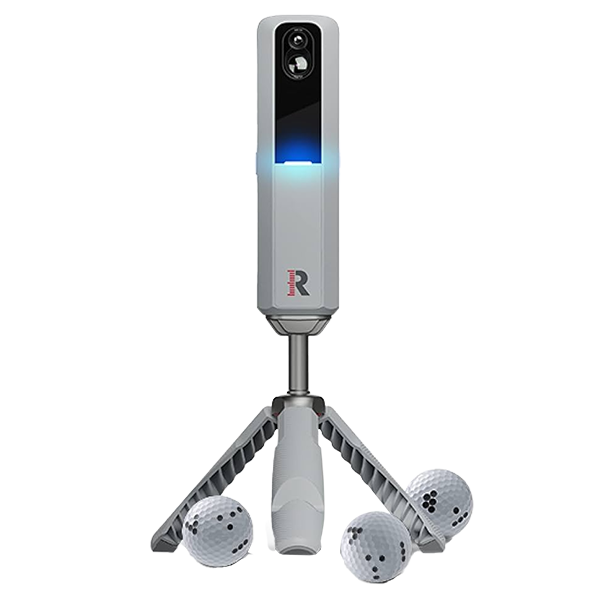
Our Review Video
Set-Up Differences of Square Golf vs Rapsodo MLM2Pro
For starters, Square is easier to work with.
It needs around 10 feet of total room length, since it sits beside the mat rather than behind the ball.
For small garages or simulator rooms, that single detail can decide whether the setup works or doesn’t.

The MLM2PRO needs roughly 16 feet front-to-back.
It’s a radar-based unit that tracks the ball through flight, so it requires more depth to measure data accurately.
You can reduce that distance slightly, but anything below about 15 feet risks misreads, particularly with driver and long irons.

The setup itself is where the two systems feel very different.
Square’s process is near-instant.
Place it beside the mat, open the app, and it automatically calibrates.
No alignment tools or manual adjustments.
Our first setup took under ten minutes, including app pairing.
That simplicity matters if you move your setup between rooms or don’t want to spend time levelling radar angles.

The MLM2PRO requires a bit more patience.
It needs to be aligned using its built-in camera, placed at the correct height and distance, and checked for level before each session.
The app does provide on-screen guidance, but it’s noticeably more exacting than Square’s plug-and-play setup.

There’s also a key usability difference.
Because Square sits to the side of the ball, left- and right-handed players can’t share the same hitting position.
You’ll need to move the unit across when switching players.
The MLM2PRO avoids that completely since it sits behind the ball.
Then there’s the hitting zone.
Square gives you a 5.9-inch square target area, which is tight compared to most systems.
The MLM2PRO’s 12-inch square zone offers more forgiveness and comfort, especially when you’re swinging longer clubs or sharing the setup.
Square also requires club stickers to unlock data like path, face angle, and impact location.
Only 20 stickers are supplied, so regular players will need refills sooner rather than later.

The MLM2PRO doesn’t need stickers.
Both units need patterned balls to capture spin properly.
Square includes three dotted balls, and we confirmed that TaylorMade TP5 Pix balls work perfectly as cheaper replacements.
Without markings, spin and spin axis are estimated. They are still playable, but less accurate.
The MLM2PRO relies on RPT balls.
They’re brilliant for data consistency, but not cheap at about $70 per dozen, and they wear out after 1,500–2,500 shots.

Once that printed pattern fades, expect no-reads to return.
That’s the hidden cost that few people mention.
Another divider is where you can use them.
Square is strictly indoor-only.
The MLM2PRO works indoors and outdoors, so you can take it to the range without issue.
Category Winner: Set-Up
Even with those differences, our verdict on setup was clear.
Square Golf wins for simplicity.
Virtual Courses Comparison of Square Golf vs Rapsodo MLM2Pro
There is a massive gap in the course offerings for Square vs MLM2pro. Currently, 16 virtual courses for Square are on offer, compared to 30,000 with Rapsodo.
A sizeable difference!
They may have far fewer courses, but from our testing, Square Golf is the winner on realism. The graphics and ball physics are noticeably better on Square than on MLM2Pro.
Square just feels more like real-life play than MLM2pros courses.

One caveat on Square is that right now, there are no real-world courses to play. They will likely be added soon, but at the moment, you will be using fictional courses.
MLM2pro has the full selection of famous courses like St Andrews and Pebble Beach, but they lock virtual courses access behind a $199 yearly subscription.

Square has a credit system to use courses, which is not as pricey, but I’ll get into that later.
What about external simulators like GSPro?
Both units have official integration with Gspro, but MLM2Pro make you pay that $199 yearly sub to access Gspro
Square doesn’t charge annual connector fees or credits to access GSPro, which means Square has the most affordable way to play GSPro right now.

Virtual Courses Winner
We are giving the win to Square for virtual courses because of the course realism and the expectation that they will keep adding more courses. Also, no connector fee to access GSPro is a big benefit.
Game improvement and fun features of Square Golf vs Rapsodo MLM2Pro
Square’s virtual driving range is straightforward but polished.
You get full ball flight visuals, accurate shot shape, and detailed spin and launch numbers.
It’s pretty clean, and it looks better than anything else under $1,000.
The layout also makes data easier to read between shots (a small thing that matters over hundreds of swings).

MLM2PRO splits this into two modes — Practice Mode and Range Mode.
Practice Mode is bare-bones, showing only numbers. This is great for pure data sessions indoors.
Range Mode adds ball flight visuals and even overlays shots on a GPS aerial view of your real range, which is a clever touch.
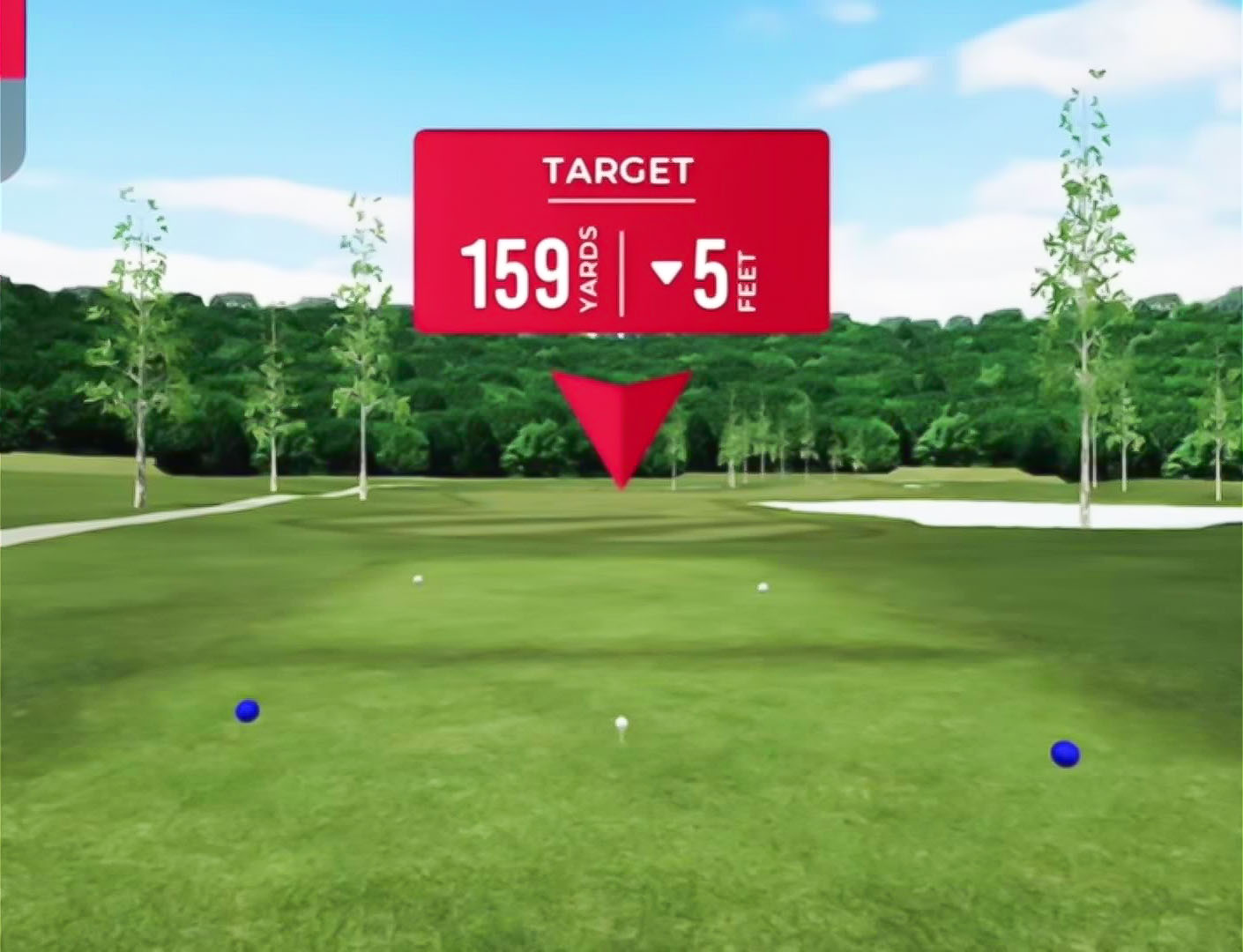
Still, we actually preferred Square’s layout.
Its graphics feel sharper, cleaner, and easier on the eyes during long sessions.
Square is data-only. There’s no video recording at all.
You see your shot shape and metrics, but not your swing.
MLM2PRO flips that around completely.
It gives you two built-in camera views: Shot Vision and Impact Vision.
Shot Vision captures your full swing from behind.
Impact Vision zooms in at the strike in slow motion, showing face angle, contact quality, and strike depth in impressive detail.

The replay appears seconds after impact, so you can instantly link what you felt with what actually happened.
For visual learners, that really helps.
You see exactly where your miss came from instead of guessing.

Square has a few smaller practice modes like Closest to the Pin, Putting, and Swing Speed Training.
Closest to the Pin is simple but fun.
You can set fixed, random, or progressive distances that increase after each shot.

MLM2PRO takes a more structured approach.
Its Target Range mode lets you choose green or fairway targets, adjust elevation, and work on specific yardages — excellent for wedge gapping.
Then there’s Combine, a 24-shot challenge that tests everything from short irons to long approaches and gives you a consistency score.
It feels professional, like a skills test rather than a game.
Most budget monitors skip putting altogether or do it badly.

Square actually gets it right.
You can adjust green speed, track roll pace, and see putt direction clearly.
It’s basic, but functional enough to practise distance control.

The MLM2PRO doesn’t support putting at all.
Square also includes a Swing Stick in the box.
It tracks path, tempo, and clubface alignment — perfect for rainy days or rehab when you can’t hit balls.
We even tested it with GSPro, and it worked seamlessly.
That gives it more long-term value than most “training sticks.

MLM2PRO has something similar called R-Speed Mode.
It lets you swing any training stick like TheStack, RypStick, or SuperSpeed, without hitting a ball.
You just toggle the mode in the app, and it records your speed instantly. We just didn’t find it as usable as Square’s stick.

Category Winner: Game Improvement
Square delivers solid practice tools and great graphics at no extra cost.
But MLM2PRO’s dual cameras and Combine-style training modes make it the stronger choice for serious game improvement.
MLM2PRO wins by a narrow margin.
Data Metrics Comparison of Square Golf vs Rapsodo MLM2Pro
Square Golf gives you a solid balance of ball and club data right out of the box.
No subscriptions. Everything’s included.
You get the core metrics listed below
Ball Data | Club Data |
Ball Speed | Swing Path |
Direction | Face Angle |
Launch Angle | Dynamic Loft |
Spin Rates | Angle of Attack |
Apex | |
Carry Distance | |
Run | |
Total Distance |
That’s more than enough to understand ball flight and make meaningful adjustments.
Where Square falls short is clubhead speed.
It’s missing. That also means no smash factor.
Without those, you can’t see how efficiently you’re striking the ball.
The MLM2PRO covers that gap.
It adds clubhead speed and smash factor, giving you a more complete picture of energy transfer and strike efficiency.
Ball Data | Club Data |
Ball Speed | Club Speed |
Launch Direction | Smash Factor |
Launch Angle | Club Path |
Carry Distance | Angle of Attack |
Total Distance | |
Spin Rate | |
Spin Axis | |
Descent Angle | |
Side Carry | |
Apex | |
Shot Type |
Overall, it tracks more total data points.
There is a catch.
To access measured spin and spin axis, you’ll need RPT golf balls and a Premium Membership.
Without both, those spin numbers stay locked.

Category Winner: Data Metrics
Even with that paywall, MLM2PRO still wins this category.
Square’s missing clubhead speed is a deal-breaker for a “complete” dataset. It’s something that should really be standard across all launch monitors.
Pricing of Square Golf vs Rapsodo MLM2Pro
Square Golf sells for $699, which is unheard of for a fully photometric system.
Every other launch monitor at this price uses radar, so Square’s camera-based tech gives it a real advantage indoors.
The big win?
No subscription.
Instead, Square uses a credit-based system, and right now, it’s the only launch monitor doing that.
You get 1,000 credits included with your purchase.
That’s good for around 55 full 18-hole virtual rounds, depending on course selection.

All driving range and Closest to the Pin modes are completely free. You’ll never burn credits for practice sessions.
If you want more credits later, you can buy packs — roughly 1,000 for about $20, with bulk discounts lowering the per-round cost.
And as i said earlier, GSPro integration is included with no hidden connector fees.
So you buy once, own it fully, and play when you want.
The Rapsodo MLM2Pro also starts at $699, but that’s only half the story.
To unlock everything like virtual courses, GSPro access, slow-motion replays, and measured spin data, you’ll need Rapsodo Premium, which costs $199 per year.
You do get a 45-day free trial, which is great for testing the full setup before committing.
But after that, it’s decision time:
Pay yearly, or go all in with the lifetime membership for a one-time $499.
That lifetime deal includes all Premium features forever, so if you plan to keep it more than two and a half years, it works out cheaper.

Still, once you factor in GSPro’s own $250 annual subscription, the true cost of a fully unlocked MLM2PRO setup lands closer to $1,200 upfront and about $450 per year if you stick to annual plans.
Category Winner: Pricing
So on pricing, the win isn’t close. Square Golf absolutely takes it.
It’s flexible, and doesn’t lock features behind a paywall.
Accuracy of Square Golf vs Rapsodo MLM2Pro
We had square side by side with higher-end units, and ball speed numbers were almost identical.
When there was a difference, it was usually 2 mph at most, which is outstanding for a sub-$1,000 camera unit.
Shot shape is also spot on.
Square picked up the shape correctly every single time for us in the testing center.

Short-game performance was even better.
Rollouts felt realistic, spin reactions on partial wedges were spot on, and even awkward lies were read correctly more often than not.
It’s not perfect and we wouldn’t expect it to be at this price.
We did see the occasional no-read, especially on partial shots or thin strikes.
It happens roughly 1 in 30 shots
Driver carry distances can also read short on occasion.
MLM2PRO, on the other hand, has improved massively since launch.
Short chips now read cleanly, carry and spin numbers are trustworthy, and what you see on screen matches what you feel.
Using RPT balls, directional feedback is accurate. Draws and fades show correctly indoors or outdoors.
It still needs careful setup and levelling, but when dialled in, it’s reliable.

Category Winner: Accuracy
But Square would be the winner between the 2 for accuracy indoors, as the camera unit is more reliable.
Customer support and Updates
Neither is winning awards for customer support just yet.
Square Golf is the smaller team of the two, and you can feel that.
The good news is that software updates roll out fast and often.
Every few weeks, there’s something new — extra features, UI tweaks, bug fixes.
You can tell the developers are listening to user feedback and acting on it quickly.

The downside is the response time.
Support replies can be slow or non-existent, depending on when you reach out.
Rapsodo and the MLM2PRO tell a similar story, just on a bigger scale.
Their updates have been consistently strong, and each one genuinely improves the product.
But again, support is the weak link.
Email responses often take a week or more, and that’s harder to excuse from a larger, established brand.
Both companies are listening, just not replying fast enough.

Category Winner: Customer Support and Updates
Overall, we’re calling this one a tie. Both are improving. Neither is perfect.
Indoor Play
For indoor play, if we combine all the key areas, we think Square Golf edges it because:
- Accuracy is more consistent indoors thanks to its camera-based system — radar units like MLM2PRO can struggle in smaller spaces.
- The graphics and overall presentation of its virtual courses look noticeably sharper and more realistic.
- Putting functionality is included, which most budget monitors (including MLM2PRO) still skip.
- GSPro integration has no connector fees, giving it better long-term value.
- Frequent updates mean there’s a real chance Square adds Combine-style training modes soon, closing the gap on game-improvement features.

Outdoor play
Outdoors is easy, Square does not work outdoors, so with Rapsodo is the choice if you think you might want to practice outside
Recap of Square Golf vs Rapsodo MLM2Pro
Both of these launch monitors have carved out clear lanes.
Square Golf is the more complete option indoors, with sharper graphics, better accuracy, and a setup that just works without constant tinkering.
MLM2PRO holds the edge outdoors, with radar tracking and camera replays that add depth to range sessions.
If you mainly practise indoors, Square is hard to beat for value and simplicity.
If you spend more time at the range, Rapsodo makes more sense.

To find out which one truly fits your space, goals, and budget, use our free tools:
- Launch Monitor Comparison Tool – compare models side by side.
- Feature Filter Tool – narrow options by what matters most to you.
- Launch Monitor Quiz – get a personalised recommendation in under a minute.
