

We’ve spent a lot of time with the Eye Mini Lite — testing and logging hours of practice, and comparing its features to other top-tier monitors.
After all that, one thing is clear: this is a disruptor.
At just $2,500, the Eye Mini Lite punches way above its price.
It delivers:
- reliable ball and club data,
- has a mountain of game improvement features across three different apps
- A sim experience that could compete with GSPro
That kind of feature set used to live in the $4–6K range. Now it doesn’t.
This review breaks down what it does well, where it falls short, and whether it’s the right fit for your home setup based on our hands-on testing, not just spec sheets.
📢 Need Help Choosing A Launch Monitor?
Use our free tools to make it easy:
🔍 Compare side-by-side
🎯 Filter by features
🤔 Take the quiz
Whether you’re comparing models, checking for essential features, or feeling unsure about your next step, our tools will help you break things down and make a well-informed decision.

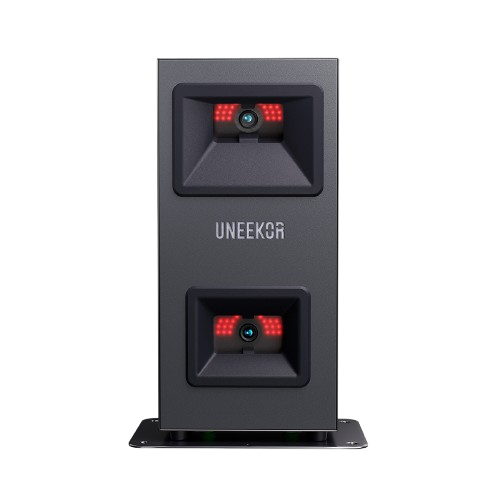
Key Points To Know About The Eye Mini Lite
- It Will Only Work Indoors
The Eye Mini Lite must be plugged into a power outlet to work. You won’t get an on-board battery. This means you won’t be able to use it outdoors at the range.
- It only works with Windows PC (No ipad connection)
It’s only going to work via a wired connection to a Windows PC—no wireless iPad or mobile device support.

What’s The Difference To The Uneekor Eye Mini?
The Uneekor Eye Mini does things the Eye Mini Lite can’t.
- It can be used outdoors on the range or the course
- It has a built-in screen so you can read your data from the unit
- It has a ‘View Air’ iPad app so you can use the software wirelessly.

This naturally means the Eye Mini is more expensive, it currently retails at around $4,500 versus $2,500 for the Eye Mini Lite.
The Eye Mini also makes our 2025 list of best launch monitors if you want to check it out.
Set-Up
You will need to add one reflective club sticker to get club data and the club Optix feature (more on that later) on the Eye Mini Lite.
Uneekor includes 20 stickers with your purchase. The stickers are pretty sturdy so they will keep for a long time. Unless you lose them which is more likely.
Standard golf balls will work with the Eye Mini Lite, no need for marked or RCT golf balls.
We were happy with the hitting zone size of the Eye Mini Lite. 8 inches length by 12 inches width.

It’s a comfortable area to work with. We recently tested the Garmin R50 and its hitting zone was 3.75 length by 8 inches width. Not much room! So the Eye Mini lite felt comfortable in comparison.
Need help finding the correct hitting zone area?
The Uneekor logo on the device will turn green when you’re in the hitting zone. It stays yellow if you’re outside this zone.
Uneekor’s View Software
We spent lots of our time practicing on Uneekor View, the virtual driving range of the Eye Mini Lite.

It comes free with your purchase, but some of the high-end features within View like Swing Optix will cost you extra as you need to buy cameras.
📢 Important: You can only use the View iPad app with the Uneekor Eye Mini. The Eye Mini Lite only has the PC version of View Software.
You get all the features you expect from virtual range software at this price range:
Shot grouping, dispersion circles, different shot angles.
‘Power U Report’s that you can export. These are particularly good as they include your club graphics and videos for each shot. More on those features later.
The user interface wasn’t our favourite.
Why?
A lot is happening on the main screen, and it can get overwhelming.

Maybe we just prefer simplicity, like the Full Swing Kit interface.
We wanted to minimize what we saw on the main View screen.
We just wanted the range and impact camera on the screen but no customization let us do this.

On the flip side, you are overloaded with quality data and visuals that can help your game in this app.
So much that we had to break down these game improvement features into sections below.
Our Favourite View App Features
Club Optix (Slow Motion Impact Video)
The Club Optix visuals are our favourite game improvement tool on the Eye Mini Lite.
Their high-speed cameras record the moment of contact between the club and the ball.
Then they will present this footage to after every shot in a digestible way:
– A short 5 second clip showing ball club interaction during impact. You can slow this video down to a few frames a second so you can catch any part you want. This video will appear on screen and play once automatically.
-Image of club and ball right on impact. Really useful if you just want a quick glance while playing instead of adjusting video.
We love this feature:
- You no longer need to guess why a shot curved, or lacked distance — the answer is right in front of you.
- Seeing toe, heel, or centre contact in slow motion allowed us to adjust quickly and re-test instantly. We found learning with visual feedback on the spot is much more effective for improvement.
- You can really focus on ‘ball first’ impact with this quick feedback
The best part of this feature?
It bridges the gap between feel and reality.
So many times i feel like I hit it flush. But Club Optix shows the truth.
For us it’s also a better impact video angle than the Garmin R50 version.
You can see more of the clubface at impact with the Eye Mini Lite. The R50 video angle is very much a side angle instead of the ‘front’ side angle of Eye Mini Lite.


Club Graphic
Next to the club optix impact video clip, you also get a club visualisation graphic.
Instead of just showing data like attack angle and club path, it gives us a clear visual of what actually happened at impact.
The red, yellow, and blue lines make it easy to see how our club approached the ball, the direction it was travelling, and how the ball launched off the face.
It helped us spot patterns — like if we’re consistently swinging too far from the inside or hitting too steeply.
One weakness of this graphic:
We wanted to see face angle and face-to-path metrics. They’re not available on the Eye Mini Lite but you can get them on the Garmin Approach R50 or Full Swing Kit.
They would show us where the clubface was pointing at impact and how it compared to the swing direction.
This makes it easier to connect swing mechanics to ball flight and spot shot patterns faster.

Swing Optix
We were really impressed with Uneekor’s Swing Optix cameras.
They record crystal-clear, high-speed videos of your swing from different angles, and the slow-motion playback is excellent for analyzing technique.

Here’s what stood out to us:
- Slow-motion clarity: We could spot small issues in our swing that we’d never notice in real time — things like wrist angles, weight shift, or subtle changes in tempo.
- Flexible camera angles: The swappable telephoto and fisheye lenses gave us control over how we captured each swing. We liked using one close-up and one wide view to see the full motion.
- Faster improvement: Being able to see what went wrong (or right) straight away made our practice sessions much more effective.
The compare section is really powerful too. Put your swings from different sessions next to each other and see improvements or problems. Another great tool for teachers.

The cameras cost $1,500 right now, so not cheap but you’re paying for quality in this case.
Just a heads-up — lighting makes a big difference. Without proper lighting, the footage can look blurry. But when the setup is right, the video quality is top-notch.
You might be asking:
Can i just use a cheaper generic camera and get the same results?
Yes and no.
A generic swing camera will record your swing perfectly, and you can look at the full 120fps video replay when you’re playing.
However, if you want to save that swing recording and view it later, it will only save in 60fps on generic cameras.
You need Swing Optix to save replays at the full frame rate.
Using an outside camera also means you can’t use the AI swing trainer feature that we talk about below.
AI Swing Trainer
💡 FYI: You can’t use this feature without Swing Optix cameras installed. It won’t work with generic USB cameras either.
Yes…AI has found its way into the launch monitor world.
Brands often try to hype a feature as ‘the future’ but you really can see this AI swing trainer as the future of golf practice.
So what is it?
Think of it as having a virtual swing coach. It’s built into the View software and works with the Swing Optix technology to give you feedback on every shot.
It’s assessing every part of your swing. The takeaway, backswing, follow through etc. Nothing is left out.
What impressed us was how quickly it spots issues in your mechanics and offers clear, actionable advice.
For example, in one swing, it flagged a lack of shoulder rotation, then immediately suggested a fix: “Check if your left shoulder is under your chin.”

Clear instructions that we could act on immediately.
Another element we looked at is the Swing Score system.
Our swing got a score out of 100, based on how closely we matched key checkpoints in the swing sequence.
The score gives you something concrete to track and improve on each time you play.
We like how they gamify this practice so you have something concrete to work toward and improve each time you play.
We think it also makes swing analysis more accessible for anyone who is not a data nerd.
You get just enough insight to improve without getting overwhelmed.
Virtual Courses
You can choose from Uneekor’s own virtual course software or connect to third parties like GSPRO.
Refine Software
Refine has Uneekor virtual course software among many other features.
The graphics on Refine’s courses?
Average. At best.

We would put them above Garmin R50’s Home Tee Hero but below Foresight FSX Play and well below GSPRO.
Terrain textures, animations and general gameplay is just smoother and more real on GSPro and FSX Play.
The bigger issue:
You only get 5 courses on Refine. And you must pay a $199 yearly “Pro” subscription fee to maintain access to the courses.
We were not impressed by this deal!
We were impressed by the other features on Refine:
Short Game Complex – This is where we spent more time than expected. You can set up all kinds of pitch, chip, and wedge scenarios. Feels more like real practice than just bashing balls.
Course Practice Mode – You pick a hole and work on specific shots from it — great for approach work or fixing trouble clubs.
Skill Challenges – Simple but useful. Distance control tests, target zones, and randomized shots help keep you focused. Closest to the pin on the island (pic below) was the best for friendly competition.

Online Play – We didn’t use it. GSPRO is too dominant right now in online play so its less popular in other ecosystems.
Driving Range – This has a cleaner interface than the View driving range. You can have the range as the center view instead of the View range where it’s offset by data.
Between Refine’s features and the visual features in the VIEW app, Uneekor has the most stacked game improvement tools we have tested. There are endless ways to improve.
What is Refine+?
It’s everything in REFINE, plus:
- 15 extra virtual courses (for a total of 20)
For us 20 courses is too little. Especially because Refine+ is only unlocked when you pay for the Champion subscription at $399 per year.
The best virtual course option is connecting to GSPRO, which we go into below.
GSPRO Integration
Good news: there is official integration to GSPRO with Uneekor Eye Mini Lite.
Bad news: You need to pay a connector fee each year to use it.

Unless you pay Uneekor’s $199 Pro subscription each year, your Eye Mini Lite won’t connect to GSPRO or any third-party software.
Connector fees are a trend we are seeing launch monitors start to follow. You can filter to see which brands charge for this in our filter tool.
Gameday
This is still in beta but we think it has the potential to compete with GSPro as a virtual simulator once they have ironed out some bugs.
The UI is cleaner, the camera angles are more engaging, and everything just runs smoother.
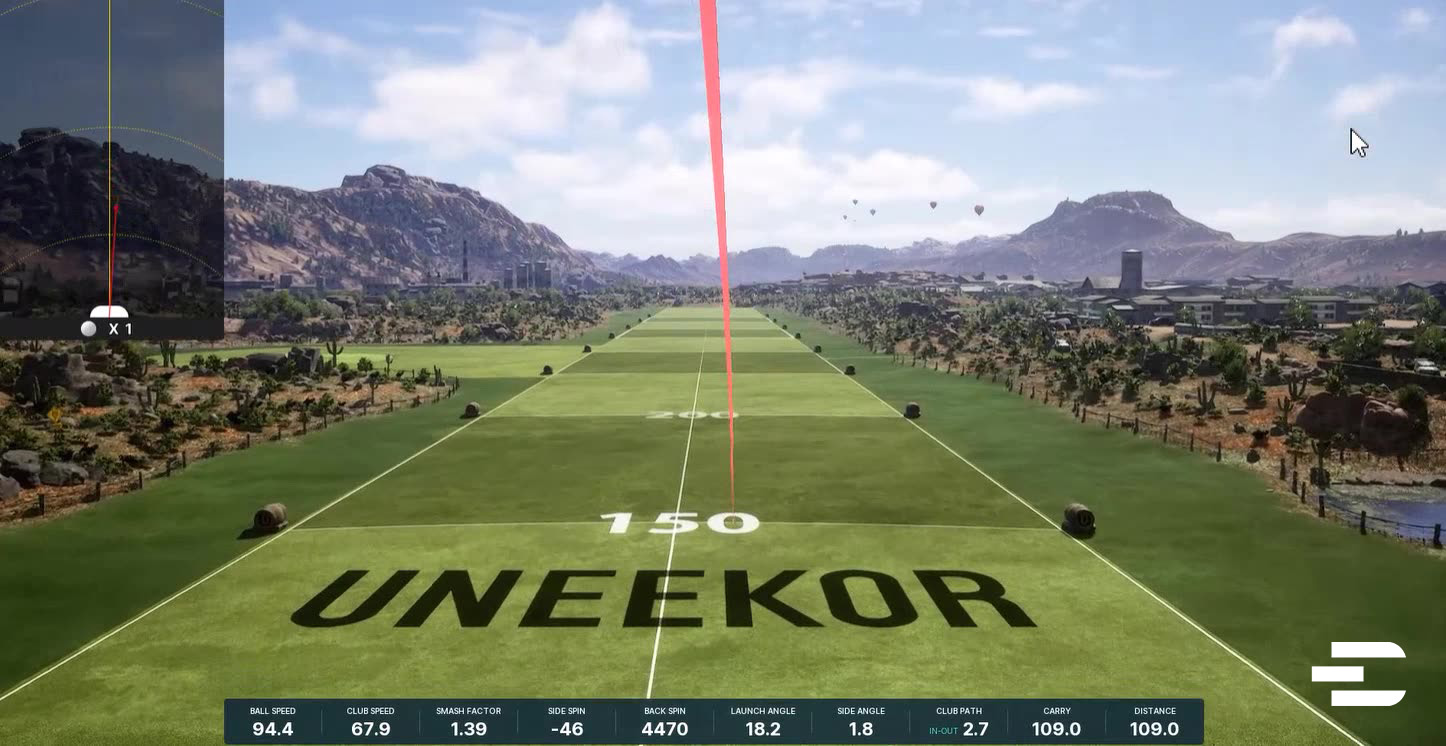
We liked the minimap, the distance markers, and how the software handles hazards and trees.
The ball physics for longer shots feels more natural too.
The ball bounces and rolls naturally, especially around the greens. Unlike GSPro, where the ball just dies on impact, GameDay lets you see the ball decelerate, roll out, and behave more like it does in real life.

Our issues:
- Chipping seems to roll too fast
- Penalty areas are a pain. No drop options and no ability to play it as it lies
- Course selection is pretty limited at the moment. Just 24 courses.
But these problems are not dealbreakers.
We also liked that you get real-life courses like Pebble Beach which is an upgrade to Refine.
And you get online live tournaments so this is direct competition to GSPro which is good for the industry.
The mini-games are a nice bonus too.
We tried out Wedge Challenge, Longest Drive (used on actual holes and not just driving range), Closest to the Pin, and a few of the practice modes like Approach and Putting — and they’re a nice addition to the game improvement tools on Refine or View software.
📢 FYI: You will need dual monitors to play Gameday, one to show gameplay and one for the controls.
Data Metrics
The Eye Mini Lite includes 15 ball data points and 4 club metrics, all included out of the box. No software upgrades, no subscriptions.

To get the club data, we had to put a small reflective sticker on the clubface. It’s not ideal, and we know some people hate it — but it’s not a big deal.
Here’s what we found most useful:
- Spin Axis + Side Spin – These helped us quickly understand why the ball was curving the way it was. Great for diagnosing a slice or hook.
- Attack Angle + Club Path – Made it easy to see if we were coming in too steep or too shallow. Helpful for both driver and irons.
Sure, the Eye Mini Lite doesn’t give us face-to-path or face angle — and when we wanted to get really technical, we missed that. If those are essential for your practice, it’s worth knowing.
But we still felt the rest of the data gave us more than enough feedback to improve.
And having flight time and descent angle — which aren’t standard on many competing monitors — gave us even more control over shot shaping and gapping.
Pricing
You will get the Eye Mini Lite for around $2,500 right now.
They’re clearly aiming to win over the indoor-only crowd with aggressive pricing, and to be fair, it’s working.
For a mid-tier launch monitor, this is a strong price point, especially when you look at how much data you’re getting for it.
Bushnell fired back with the Bushnell LPI, which is also indoor-only and priced around $2,700 — but they include the first year of subscription to sweeten the deal.

We’ve tested both, and from a pricing standpoint, Uneekor is a better deal even with Bushnell’s free trial.
Another popular alternative in this range is the SkyTrak Plus. It also targets indoor users, offers strong game improvement features, and sits around the same price point.
👉 We’ve done a full hands review on SkyTrak Plus if you want to see how it stacks up.
Uneekor is betting on long-term users who’ll see the value in View/Gameday software and optional subscriptions, while Bushnell is trying to remove barriers upfront.
Both strategies make sense but if you want max value without relying on a free trial, the Eye Mini Lite is hard to ignore.
Uneekor also has four subscription tiers right now, which makes selection trickier.

At least the virtual range is included for free.
If you want to play sim golf on GSPro, you’ll need the Pro plan ($199/year) at a minimum. It also gives you access to Uneekor’s Refine software with that very limited 5 courses.
The higher tiers add more:
- Champion ($399/year) upgrades to Refine+ with 20 courses and adds AI Trainer
- Ultimate ($599/year) gives you everything, including GameDay and expanded multiplayer and practice features
And you can get Gameday software on its own without View or Refine software for $199 per year.
Accuracy Testing
We don’t do side-by-side comparisons because the tech interferes with each other, but our pro golfer has been using it regularly and tracking how well the numbers line up with his known stats.
Carry, spin, launch — it’s been within the expected ranges, shot after shot.

As we mentioned, chipping on Gameday courses was not right but it’s a new software just out of beta so expect updates here.
His high spin drives were not showing any odd spin readings either. We know this area had issues in the past but it seems like recent software updates have debugged this.
We had the odd missed read, but it was like 1 in 40 shots. Otherwise, the ball does exactly what we expect it to. Carry, shape, height — it’s all tracking well.
One thing we can’t fully test is real-world ball flight accuracy.
Because the Eye Mini Lite is indoor-only, we can’t do our usual test of comparing virtual ball shape with actual ball flight outdoors
Who Should Stay Away From The Uneekor Eye Mini Lite?
Obviously, if you have any desire to play or practice outdoors with your launch monitor, it’s not for you.

And if you’re deep into swing mechanics and need face-to-path or face angle, you’ll probably want to look at a higher-end Uneekor model or something like the Full Swing Kit or Mevo Plus Pro Package.
Final Thoughts
We’ve spent enough time with the Eye Mini Lite to say this confidently — it’s one of the best options out there for indoor golfers who want serious data without overpaying.
If you mostly play indoors, want accurate feedback, and don’t need face-to-path data, this is a smart buy.
Our concern with the course selection and gameplay quality of the Refine virtual courses has been cancelled out by the recent Gameday release.
As Gameday continues to improve, it will be hard to beat the Uneekor Eye Mini as the top ‘indoor only’ launch monitor.
It has the game improvement features, the data metrics, the virtual course gameplay and the competitive pricing to match anyone.
It’s not trying to do everything — but what it does, it does very well.
