

At first glance, it feels like an easy decision.
Pick the Uneekor Eye Mini if you’ve got the budget.
Pick the Eye Mini Lite if you’re only playing indoors.
Simple, right?
But once you look at how the two units actually work — and how you practise — it gets more interesting.

There are a few overlooked details that make the more expensive Eye Mini a better option for some indoor setups, too, and they’re not obvious.

We’ll get into those shortly, but first, let’s break down the main differences between these two launch monitors.
📢 Need Help Choosing A Launch Monitor?
Use our free tools to make it easy:
🔍 Compare side-by-side
🎯 Filter by features
🤔 Take the quiz
Whether you’re comparing models, checking for essential features, or feeling unsure about your next step, our tools will help you break things down and make a well-informed decision.
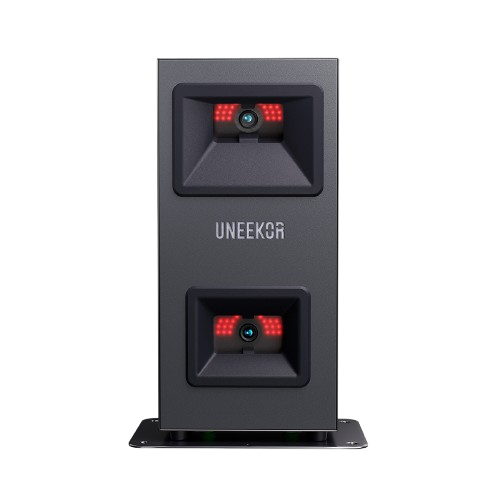

Difference 1: Power Setup and Portability
The Uneekor Eye Mini is battery powered and works for about 6 to 8 hours per charge. We liked that it gives you peace of mind at the course — you’re not constantly stressing about it dying mid-session.
You don’t need to plug it into a wall, so you can set it up at the range, in your garden, or on the go. No wires needed.

The Eye Mini Lite, by contrast, must be plugged into a power outlet at all times. You’re basically limited to indoor play.
(If you’re leaning toward the Lite, we’ve also done a deeper dive into its pros, cons, and best use cases in our full Eye Mini Lite review. If you want to see our overall favourites check out our best launch monitor list)

It’s not that you can’t move it but doing so means dealing with power cables and making sure there’s a socket nearby.
So range play and on the course use is not an option.
Difference 2: Device Compatibility
- Eye Mini supports Uneekor’s View Air iPad app — which means you can go wireless indoors.
- Eye Mini Lite is PC-only. No tablet support at all.

📌 Important catch: Even with the Eye Mini, you won’t be able to run Refine or Gameday on iPad. Those apps demand PC-level graphics. So your iPad experience is limited to the View driving range.
You also can’t use E6 or Awesome Golf on iPad with the Eye Mini. iPad support is Uneekor-only.
Difference 3: Built-In Screen
The Eye Mini has a built-in e-ink screen on the unit itself. You can view ball speed, distance, spin, and other data directly on the device without starting up any software.

We didn’t think we’d use the screen that much… but we did. Every time we wanted a quick carry number or club speed reading, it was right there. We didn’t need to load software, connect to Wi-Fi.
Outdoors, it is obviously a key feature, particularly on the course.
The Eye Mini Lite doesn’t include a display. You’ll need to boot up a PC every time to access your numbers.

Two Overlooked Reasons to Pick the Eye Mini Indoors
If either of these apply to your setup or goals, the Eye Mini could be the smarter buy—even if you’re not planning to use it outdoors.
Two scenarios most people overlook:
1. Mixed-Handed Golfers
- The Eye Mini Lite is tethered by power.
- To switch between right- and left-handed players, you’ll have to unplug it, drag it across the mat, and hope your power and Ethernet reach.
- It’s fine once or twice. Annoying if you’re doing it every session.

The Eye Mini, being wireless, is far easier to move. Just pick it up and place it on the other side. For mixed-handed groups, or if you’re coaching this makes the Eye Mini a better option indoors.

2. Quick-Hit Practice Style
This is one of the most important—but often overlooked—questions to ask yourself.
Are you the type of golfer who loves quick practice sessions?
Maybe you just want to hit a few wedges after work, check your carry distance or club head speed, and call it a day.
The Eye Mini’s built-in screen makes that easy. Just turn it on and hit. Numbers show up immediately. For fast sessions, it becomes your go-to.

The Eye Mini Lite can do the same job — but only once the PC is on, software loaded, and everything’s connected.
If you’re the “practice in short bursts” type, the Eye Mini could be worth that extra investment over time.

What’s Actually the Same?
This one’s easy. Pretty much everything else.
| Feature | Eye Mini | Eye Mini Lite |
| Data Accuracy | ✅ | ✅ |
| Ball + Club Metrics | ✅ | ✅ |
| Software Access | ✅ | ✅ |
| Club Optix Impact Video | ✅ | ✅ |
| Hitting Zone Size | ✅ | ✅ |
| Refine + Gameday Compatible | ✅ | ✅ |
You’ll get the same core data. Same shot feedback. Same Refine and Gameday features — assuming you’re on the same subscription tier.


Impact replays? Same angle. Hitting zone? Same dimensions.

There’s no performance trade-off. You’re choosing how and where you want to practise.
Final Thoughts
Both launch monitors offer the same core performance — so it really comes down to how you like to practise and what your setup looks like.
If you’re always on a PC indoors and want to save a bit, the Eye Mini Lite is a solid, no-frills option.
But if you value flexibility, quick sessions, or plan to switch locations or players regularly, the Eye Mini might justify the extra spend — even indoors.
Still unsure?
Use our Launch Monitor Comparison Tool to see all the key specs side by side, or try our Filter Tool and Launch Monitor Quiz to get tailored recommendations based on your needs.
It’s not just about price — it’s about picking the right fit for how you play.
